SMS Communications & Consent
Effective Date: April 2026
Last Updated: April 10, 2026
1. About Repstly SMS Messages
Repstly is a SaaS platform used by businesses to manage appointments. Through our service, customers may receive transactional SMS messages from the businesses they book with, including:
- Appointment confirmation requests with a link to confirm or cancel
- Appointment reminders
- Status updates (confirmed, cancelled, rescheduled)
Message frequency varies based on the customer's appointment activity. Message and data rates may apply. Reply STOP to cancel, HELP for help. Carriers are not liable for any delayed or undelivered messages.
2. How Customers Opt In (Two Methods)
Method 1: Appointment Confirmation Page
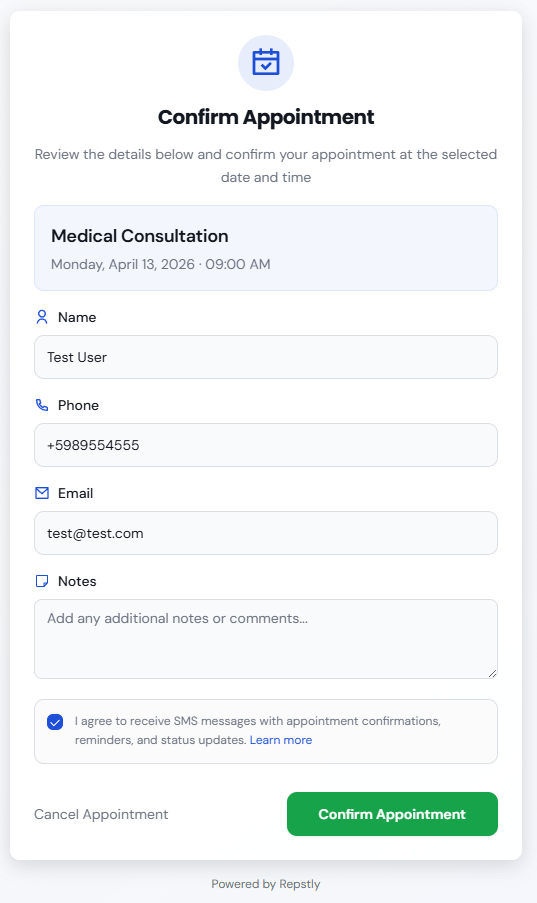
When a customer receives an SMS with an appointment confirmation link, they are directed to a web page where they can review and confirm their appointment. On this page, they:
- Review their appointment details (date, time, service)
- Verify or update their contact information (name, phone, email)
- See a consent checkbox (unchecked by default) with the text: I agree to receive SMS messages with appointment confirmations, reminders, and status updates. Below it: Message frequency varies. Message and data rates may apply. Reply STOP to cancel, HELP for help. Links to SMS Terms, Privacy Policy, and Terms of Service.
- Confirm or cancel the appointment
Live Demo
View a live interactive demo of the appointment confirmation page (with sample data, no real booking):
https://repstly.com/confirm-date?demo=trueScreenshot of the appointment confirmation page showing the consent checkbox:
Method 2: AI Voice Assistant
When a customer calls a business using Repstly's AI voice assistant, the assistant identifies the caller's phone number from the incoming call and verbally requests consent before sending any SMS:
"By providing your phone number, you will receive an SMS message with a link to confirm or cancel your appointment."
The call is recorded and stored as proof of consent. Sample transcript snippet:
Assistant: I'd be happy to book your appointment. I'll send a confirmation SMS to the number you're calling from. Is that okay?
Customer: Yes, that's fine.
Assistant: Perfect. You'll receive a text message shortly with a link to confirm or cancel your appointment.
3. Message Examples
Below are example messages that customers may receive through Repstly:
1. Appointment Confirmation Request
Hi John, your appointment for General Consultation with Vida y Salud on March 30 at 9:30 AM has been scheduled. Please confirm or cancel using the following link: https://repstly.com/confirm-date?companyId=abc123&eventId=evt456 - Reply STOP to opt out.
2. Appointment Reminder
Reminder: You have an appointment for Dental Cleaning with SmileCare tomorrow at 2:00 PM. If you need to reschedule, please call us. Reply STOP to unsubscribe.
3. Confirmation Message
Your appointment for Hair Styling with GlamStudio on April 5 has been confirmed. We look forward to seeing you! Reply STOP to opt out.
4. Cancellation Message
Your appointment for Physical Therapy with HealthFirst on April 10 at 11:00 AM has been cancelled. If this was a mistake, please contact us to reschedule. Reply STOP to opt out.
4. Privacy & Opt-Out
We do not share mobile phone numbers with third parties or affiliates for marketing purposes.
To opt out of SMS notifications, reply STOP to any message. To get help, reply HELP. You can also uncheck the consent checkbox on the appointment confirmation page, or contact the business directly.
See full Privacy Policy and Terms of Service.
5. Contact
For questions about SMS communications:
Email: support@repstly.com